> ## Documentation Index
> Fetch the complete documentation index at: https://pactto.mintlify.site/llms.txt
> Use this file to discover all available pages before exploring further.

# Payment Required

When you set the 'paymentRequired attribute to false, after the video is uploaded, a payment button is not displayed. The default value for the 'paymentRequired' attribute is true, so by not adding the attribute, users will always be presented with the payment button after the upload.

```html index.html theme={null}
<script>
    window.pactto = window.pactto || {};
    window.pactto.coach = 'username';
    window.pactto.company = 'Coach Name';
    // Add paymentRequired attribute:
    window.pactto.paymentRequired = false;
</script>
```

Below you can see with payment button:
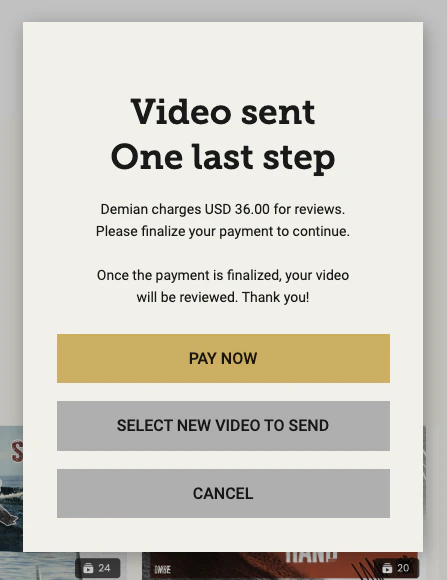
<Frame caption="paymentRequired = true (default)">
  <img style={{ borderRadius: '0.5rem' }} src="https://mintcdn.com/pactto/NmqKkk76fDeb9hUF/images/payment-required-true.png?fit=max&auto=format&n=NmqKkk76fDeb9hUF&q=85&s=e3f91ef25dc6be66dd97f98aba47a2e9" alt="paymentRequired = true (default)" title="paymentRequired = true (default)" width="447" height="580" data-path="images/payment-required-true.png" />
</Frame>

Below you can see without payment button:
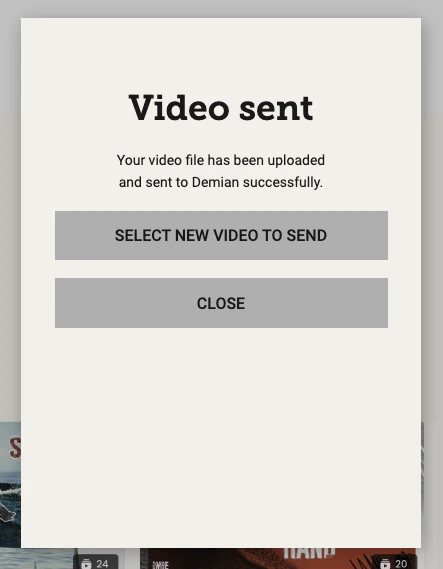
<Frame caption="paymentRequired = false">
  <img style={{ borderRadius: '0.5rem' }} src="https://mintcdn.com/pactto/NmqKkk76fDeb9hUF/images/payment-required-false.png?fit=max&auto=format&n=NmqKkk76fDeb9hUF&q=85&s=993661d73aba324e7ad39b85024f13d6" width="443" height="569" data-path="images/payment-required-false.png" />
</Frame>
